Wednesday, 2 March 2022

PCMtuner V1.21 ECU Programmer for 67 Models Master Version(FAQs)

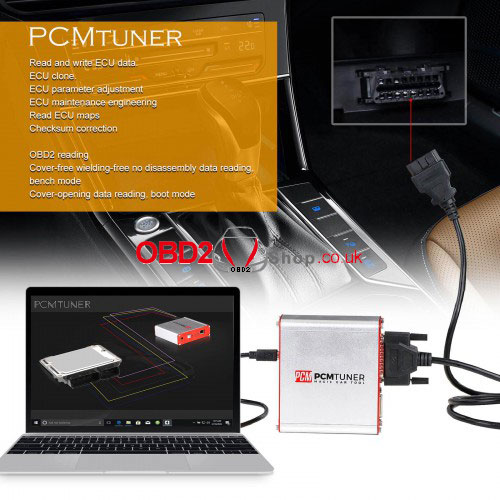
2022 latest Mater version PCMtuner V1.21 ECU Programmer supports 67 models to do read & write ECU data, ECU clone, ECU parameter adjustment, ECU maintenance engineering, read ECU maps, checksum correction, etc.

Compare to version 1.20, PCMtuner V1.21 has added 44 new protocols, Bosch ECU read/write protocols without opening the cover. Good news is either V1.2 KTM BENCH or KTM Flash 3 in 1 users can purchase the PCMtuner V1.21 Dongle for upgrade.

pcmtuner-v1-21-ecu-programmer-for-67-models-master-version-faqs-1


Why to get V1.21 PCMtuner?

1.PCMtuner supports 67 models covering Mercedes, VW, Ford, Mazda, Land Rover, Toyota, Lexus, Honda, Nissan, Infinity, Subaru, Kia, Hyundai, Renault, Mitsubishi, etc.

2.PCMtuner is able to read & write ECU data through OBD/ BENCH/ BOOT modes.

3.PCMtuner performs a complete backup of ECU data, easy ECUs clone and power upgrades.

4.PCMtuner supports to read & write gearboxes.

5.PCMtuner V1.21 software allows users to forcibly write(forcibly clone) without verification, forcibly reading and writing unknown ECUs.

6.Professional tuner can free download WinOLS damaos, A2L, map package.

7.PCMtuner supplies VR files for all legal users.

8.Our engineer can provide customers stage1, stage2, stage3, popbangs, gearbox data to adjust LC, sport display, immo off, adblue off, dpf off, dtc off, vmax, swirl off, restoring ECU or TCU factory setting service(paid service). 

9.We has helpdesk for users. Moreover, we can offer users a platform to work with our high level tuners, from whom you may learn a lot.
pcmtuner-v1-21-ecu-programmer-for-67-models-master-version-faqs-2

pcmtuner-v1-21-ecu-programmer-for-67-models-master-version-faqs-3


Features

1. Read and write ECU data.

2. ECU clone.

3. ECU parameter adjustment

4. ECU maintenance engineering

5. Chip turing

6. Read ECU maps

7. Checksum correction

8. Stage1-3, gearbox tuning , LC, sportdisplay , immo off, adblue off, dpf off, dtc off ,vmax ,swirl off

9. Read flash and ep files

10. Powertrain adjustment

11. Support online update

12. VR files  supply 

13. Pinout comewith

14. Helpdesk and tuner account 

15. OBD2 reading

16. Cover-free wielding-free no disassembly data reading, greatly reduce the risk of destroying the ECU, bench mode.

17. Cover-opening data reading, boot mode


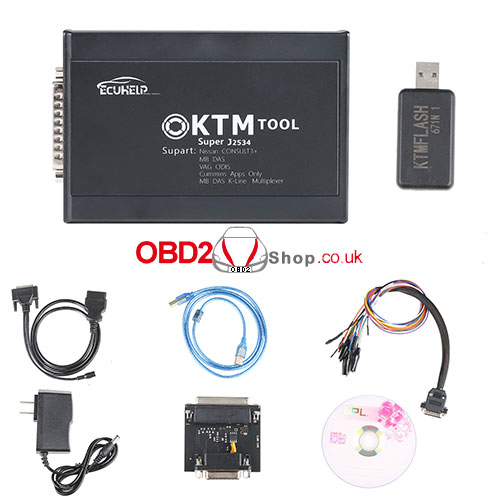
What’s in PCMtuner package?

BENCH/BOOT Cable

OBD Cable - 1pc.

Power Adapter - 1pc.

Master Interface - 1pc.

USB cable - 1pc.

Smart Dongle - 1pc.

pcmtuner-v1-21-ecu-programmer-for-67-models-master-version-faqs-4


How to create PCMtuner account?

1.Contact OBD2shop online service to help create PCMtuner account.

2.Log in https://support.vz-performance.com/ to link with your tool.

Note: 

1.All users account must be requested from sellers. 

2.After activation, user name is your register email, password is series number. It’s automatically created.

3.DO NOT work with any other unknown software in case locked.


PCMtuner ECU Programmer FAQs

Q: Where to download PCMtuner V1.21 software?

A: Please contact OBD2shop online service for secure download.


Q: What’s the “VR Files” meaning? Does PCMtuner read access VR file server?

A: That means virtual reading. It’s only one function on PCMtuner.


Q: How to get map or VR files with PCMtuner tool?

A: Log in https://support.vz-performance.com/ to acquire map, VR files & winols damaos.


Q: How to use PCMtuner Software Dongle?

A: Just plug the dongle, no more operations. Gray unselectable options will be workable after upgrade.


Q: Can PCMtuner support online update, helpdesk and tuner account?

A: Yes, all support.


Q: Can PCMtuner support to do online?

A: Yes, it also supports to read & write ECU offline.


Q: Can I work on my map alone?

A: Yes, but it’s with other software.


Q: Can PCMtuner support edc 16 backup directly from the comb?

A: Yes.


Q: Can PCMtuner support to program FCA MJ9DF?

A: Yes.


Q: What’s “Scanmatik 2 Pro” in module 71?

A: It’s a software driver will install automatically. That means PCMtuner can support Scanmatik 2 Pro.


Q: Can PCMtuner read eprom without opening edc16 & sid 804?

A: Module 71/ 53/ 58 need to read ON BENCH, other modules support to read by OBD.


Q: Can PCMtuner support EDC17 CP44? How to read in virtual?

A: It supports VAG 0L TDI(EDC17CP44), 2L TDI(EDC17CP44). The factory will provide a client for check after virtual reading successfully.

www.obd2shop.co.uk


Friday, 18 February 2022

KTM200 KTM1.20 Latest Software Free Download & FAQs

Different from KTM100, latest version KTM200 KTM1.20 ECU Programmer has added 379 new protocols, added 200 Bosch ECH read & write protocols without opening cover and updated 374 protocols. Users can return old dongle to upgrade KTM200 or PCMtuner V1.21, details please contact Obd2shop online service.


Free download KTM200 KTM1.20 Software

Link: https://share.weiyun.com/bG2lLOp5

Password: udv8ds

(If you don’t know how to download, feel free to contact us.)

ktm-tool

KTM 200 67 in 1 ECU Programmer FAQs

Q: What’s KTM200 different from PCMtuner?

A: Both hardware are the latest version to support same functions at present. In addition to different appearances & factories, KTM software version is 1.20 while PCMtuner is 1.21. It’s said PCMtuner will update in the future.


Q: Both KTM200 & PCMtuner support network use?

A: Yes, both support.

pcmtuner

Q: Can KTM200 support to program Marelli 9df by OBD?

A: Yes, apart from module 71/ 53/ 58, all other modules are programmed by OBD. This is exactly the OBD method.


Q: Does KTM200 support virtual reading?

A: Yes.


Q: What language does KTM200 support?

A: English & Russian.


Q: Can KTM200 read & write Volvo V50 2006 2.0 - sid803?

A: If the vehicle is SH7058 EEPROM(56) ECU chip, then it supports.


Q: Can I purchase KTM200 to upgrade old KTM Flash directly?

A: No. As for different hardware, please return back old dongle for upgrade. Details please contact our online service.

http://blog.obd2shop.co.uk/ktm200-ktm1-20-latest-software-free-download-faqs/


Tuesday, 25 January 2022

Solution: KESS V2 is Unable to Display Connection Diagram

Problem

After installing KESS V2 software, no matter which car model or ECU selected, there are no connection diagrams. It only gives me a blank page. What’s the reason?

solution-kess-v2-is-unable-to-display-connection-diagram-1

solution-kess-v2-is-unable-to-display-connection-diagram-2

Solution

The reason why causes this issue is because of TF card.

1. Take out TF card from KESS to clean, then reinsert to have a try;

2. If issue still persists, which means the TF card is damaged. Please exchange a new TF card.


This is how to solve KESS software is unable to display connection diagram problem.

Hope it is helpful.

Article Source: http://blog.obd2shop.co.uk/solution-kess-v2-is-unable-to-display-connection-diagram/


Tuesday, 25 May 2021

How to Install/Use Iprog + PCF79xx SD-Card Adapter?(V85 Iprog Download)

Buy V84 Iprog Pro ECU Programmer now can upgrade to V85 Iprog's latest version.


Where to download the latest version V85 Iprog version:

https://share.weiyun.com/puRcPZ6G

Password: oipqga

Operating systems: Windows 7


How to install V85 Iprog in Win7?

1. Unzip "iprogV85" to C disk;

install-use-iprog-pcf79xx-sd-card-adapter-v85-iprog-download-01

2. Computer >> Manage >> Device manager >> Other devices >> Iprog universal programmer >> Update driver software >> Browse my computer for driver software >> Select “iprog_win2k_win7_x86-x64_version2”, click “OK”>> Next >> Install this driver software anyway;

install-use-iprog-pcf79xx-sd-card-adapter-v85-iprog-download-02

install-use-iprog-pcf79xx-sd-card-adapter-v85-iprog-download-03

install-use-iprog-pcf79xx-sd-card-adapter-v85-iprog-download-04

install-use-iprog-pcf79xx-sd-card-adapter-v85-iprog-download-05

install-use-iprog-pcf79xx-sd-card-adapter-v85-iprog-download-06

3. Open “IprogProV85” after installation completed, now you can start to program.

install-use-iprog-pcf79xx-sd-card-adapter-v85-iprog-download-07

How to use Iprog Programmer + PCF79xx SD-card Adapter to read & write key?

1. Insert PCF79xx SD-card Adapter to Iprog programmer, connect with a key & computer via cable;

install-use-iprog-pcf79xx-sd-card-adapter-v85-iprog-download-08

install-use-iprog-pcf79xx-sd-card-adapter-v85-iprog-download-09

2. Start Iprog software, follow the path to select: MCU>> PCF79xx + SD;

install-use-iprog-pcf79xx-sd-card-adapter-v85-iprog-download-10

install-use-iprog-pcf79xx-sd-card-adapter-v85-iprog-download-11

3. Select PCF type, click “Connect”, the green light of the adapter will be on, which means the connection is successful.

install-use-iprog-pcf79xx-sd-card-adapter-v85-iprog-download-12

install-use-iprog-pcf79xx-sd-card-adapter-v85-iprog-download-13

Now you can continue to read & write EEPROM.


This is how to install & use Iprog Programmer + PCF79xx SD-card Adapter.

https://www.obd2shop.co.uk/


Friday, 13 November 2020

Read frm3: Xprog 5.55? Xprog 5.84? Orange5 Clone?

Purpose: Read frm3

ECU programmers to try and test reports:

Xprog 5.55 clone reviews on reading FRM3:

1. When I read d-flash is always corrupted. 

2. Had the same with 5.55, no way to verfiy or to read FRM3 correctly.

Bought Xprog 5.84 and no problem anymore.

3. flash the atmega with 5.51 luis andre that is stable, 5.55 is useless.

Orange 5 clone reviews on reading FRM3:

My China Xprog reads differently every read for FRM3. Useless tool, no matter which program version.

I replaced it with Orange5

Orange5 Clone works perfectly fine. The process is very slightly different, but it has been documented here in the forum. It works well 

Clone UPA reviews on reading FRM3:

Clone UPA does not work on frm3 at all.

Downgrade to Xprog 5.51 works but that version lacks the possibility to read broken dflash so you'l have to use a dump from internet and code afterwards.

Enjoy!

www.obd2shop.co.uk


Friday, 30 October 2020

How to fix VW crafter ECU EDC16C34 locked with KTAG?

Malfunction: VW crafter ECU locked accidentally, ECU type: I believe it's an EDC16C34


Problem description:

The crafter needed its dpf and egr de-activating so using kess v2 i read the ecu file (all went fine). Using a program called "ecu safe" i de activated the dpf+egr then wrote the new file back to the vans ecu (all fine and van running perfect).

Now to the problem, the crafter needs a 62mph limit by law and it seems i had somehow removed this with the new file. I have re written the file with unchecking the Vlimit removal, saved the file and tried to write this to the ecu but it fails every time saying "wrong security code". The kess software will no longer work, ID-READING-WRITING-RECOVER all these give the same error. Looking back at ecu safe there is a check box marked "protection", did i accidently leave this box checked, could this be why i cant access the ecu?

Attach the original file (from @ neilmch) here:

https://mega.nz/file/ldBnRQ6D#6SJ8sq_42OOL4dQz9dyYnQQTI8MpwcvlfSF5YdR4i7M

crafter reading 1 - file saved when Kess read ecu

crafter read - text file that was created (cant remember if it was when read)

crafdpf+egr - this is the file i wrote to the ecu.

The crafter is a 2.5l diesel, BJL engine code and i think the ecu is bosch EDC16CP34.

The Kess protocol was 73.

@ peechie replied:

You need to open the ECU and attach the BDM adaptor (Bosch) to your ecu as pictured. You need to buy KTAG ECU programmer and the adaptors. You don't need to lift the PCB. The BDM pads are on the lower part on the top side.

It is an easy job but it might be better if you take the ecu to someone who can bench it and ask them to write a BDM original to it.

ktag

Hope it helps!

Thanks again to @ neilmch and @ peechie.

http://blog.obd2shop.co.uk/how-to-fix-vw-crafter-ecu-edc16c34-locked-with-ktag/

Wednesday, 14 October 2020

(Solved) KTAG 7.020 Ksuite V2.25 does not work

Customer Problem:

Hi, I install the Ktag V2.25 software but the menu is all gray and I can't select a car.

I have tried to reinstall it and the result is the same.

I have also tried to install it on another PC and the failure is the same.

I think that for some reason the ktag has stopped working. It appears in the Windows device manager but does not communicate with the ksuite software.

ktag-error-01

OBD2shop.co.uk engineer solution:

About the gray menu, it is the TF card problem, please take out the TF card and insert it again, check if it can work.

The customer's response:

The software can be selected but still does not work.

"Well, no luck. I have tested with 2 ECUs of Honda Accord 2.2 i-dtec and it does not work with any.

I attach photos with the screenshots.

After a while in which it does not go beyond "identifying ECU" the error in the photo appears."

ktag-error-02

ktag-error-03

ktag-error-04


Below is the ECU wiring diagram:

ktag-error-05

ktag-error-06

OBD2shop.co.uk engineer solution:

Please see the attached image.

Branch this red wire out another wire and connect it to the place of the orange wire.

ktag-error-07


The customer's response:

Well it works. It seems incredible to me that following the instructions of the software it does not work and that in the other ktag that we have it works perfectly with the orange cable and that in this it is necessary to put the 3 red cables.

But hey, I'm happy because in the end it has made it work.

Thank you very much.


http://blog.obd2shop.co.uk/solved-ktag-7-020-ksuite-v2-25-does-not-work/

Formula Flash New Ford Bench Support: SID211, SID212 & SID212EVO

Formula Flash expands its Ford Bench support with new coverage for the SID211 and SID212/SID212EVO ECU families. The update adds Bench Mode...